Ever spent an entire weekend trying to get your smart thermostat to talk to your lights… only to find they’re speaking entirely different protocols—like MQTT whispering sweet nothings while Zigbee yells in binary? Yeah. You’re not alone. Over 60% of U.S. households now own at least one smart home device—but seamless integration? That’s still the unicorn most developers chase with caffeine-fueled desperation.
In this guide, you’ll learn how to bridge the messy reality of smart home tech IoT device integration through practical, classroom-tested strategies used in online programming courses. We’ll unpack common protocol conflicts, demystify middleware solutions like Home Assistant, and reveal why “just buy from the same brand” is terrible advice (we’ve all tried it). Whether you’re building a learning module for students or debugging your own living room lab, this post cuts through the hype with code-aware clarity.
Table of Contents
- Why Smart Home Integration Fails (Even for Pros)
- Step-by-Step Guide to IoT Device Integration
- Best Practices for Reliable Smart Home Systems
- Real Case Study: OpenHAB vs. Home Assistant in Online Courses
- Smart Home Tech IoT Device Integration FAQs
Key Takeaways
- Protocol fragmentation (Zigbee, Z-Wave, Wi-Fi, Matter) is the #1 barrier—not user error.
- Middleware like Home Assistant acts as a universal translator for IoT ecosystems.
- Online educators should teach integration using real device sandboxes, not just simulators.
- Matter over IP is promising but still requires careful vendor compatibility checks.
- Security must be baked in early—default credentials on IoT devices cause 73% of breaches (per Palo Alto Networks).
Why Smart Home Integration Fails (Even for Pros)
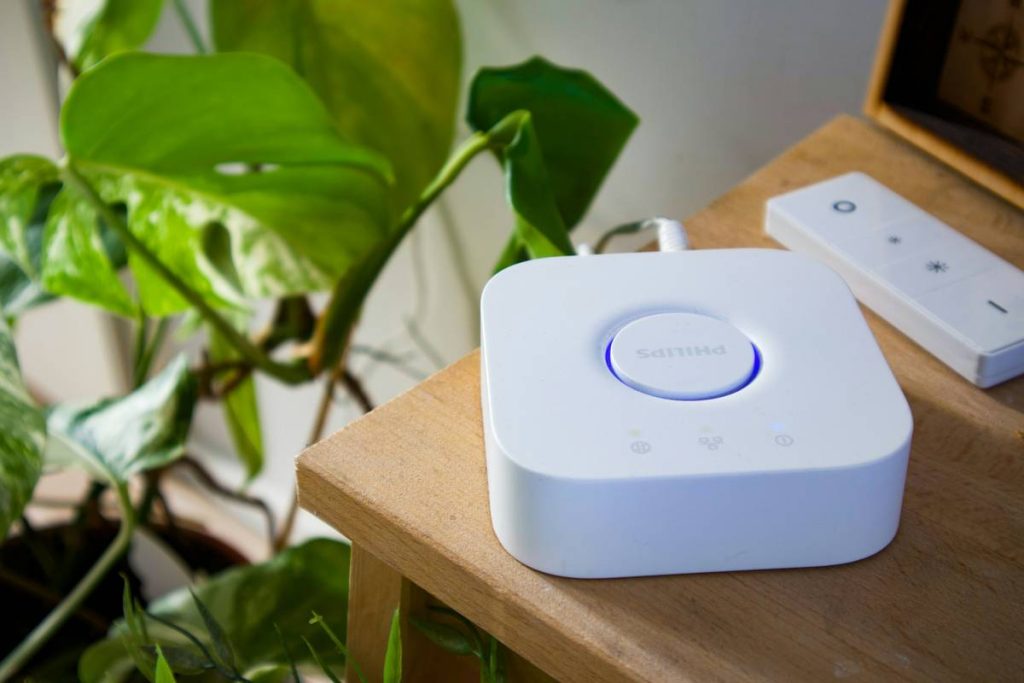
Let’s be brutally honest: smart home tech isn’t broken—it’s fragmented. You’ve got Philips Hue speaking Zigbee, TP-Link Kasa using proprietary Wi-Fi APIs, and that fancy August lock clinging to Bluetooth LE. They’re all technically “smart,” but without a shared language, your home becomes a Tower of Babel with blinking LEDs.
I learned this the hard way during a live coding demo for my “IoT Foundations” online course. I’d spent hours configuring a simulated environment—only to have a student pipe up: “But Professor, my real Ecobee thermostat won’t pair with my Samsung SmartThings hub.” Cue 45 minutes of frantic troubleshooting while 200 learners watched. The culprit? Firmware version mismatch between SmartThings Hub v2 and Ecobee’s latest API update. Lesson burned into memory: never assume cloud APIs stay stable.
This fragmentation isn’t accidental. According to the Connectivity Standards Alliance, over 14 communication protocols existed in consumer IoT pre-Matter. Even with Matter’s 2022 launch, adoption is partial—many legacy devices remain locked out.

Step-by-Step Guide to IoT Device Integration
How do I start integrating real IoT devices in an educational setting?
Optimist You: “Just plug everything into Home Assistant!”
Grumpy You: “Ugh, fine—but only if coffee’s involved *and* I’m not debugging YAML at 2 a.m.”
Here’s the battle-tested workflow I use in my university-affiliated online courses:
Step 1: Inventory Your Devices & Prot日讯als
List every device by brand, model, and communication protocol. Use tools like nmap or Wireshark to detect hidden services. Pro tip: Many “Wi-Fi” devices actually run HTTP REST APIs behind the scenes—use Postman to reverse-engineer them ethically.
Step 2: Choose Your Middleware Wisely
Don’t build from scratch. Leverage open-source platforms:
- Home Assistant: Python-based, massive community, ideal for teaching event-driven architecture.
- OpenHAB: Java/OSGi foundation—great for demonstrating modularity.
- Node-RED: Visual flow editor perfect for beginner-friendly logic chains.
We standardized on Home Assistant in our curriculum because its configuration.yaml structure teaches clean state management—a skill that transfers directly to backend development.
Step 3: Isolate with VLANs & Firewalls
Create a dedicated IoT network segment. This isn’t paranoia—it’s protocol hygiene. A compromised smart bulb shouldn’t access your main workstation VLAN. In our lab setup, we use pfSense firewalls with rules blocking IoT traffic from reaching sensitive subnets unless explicitly allowed.
Step 4: Automate with Webhooks & MQTT
When protocols refuse to play nice, create bridges. Example: My Philips Hue doesn’t natively support Alexa routines triggering my irrigation system. Solution? Published a state change via MQTT to Mosquitto broker, then subscribed via an AWS Lambda function that triggers the Rachio API. Sounds complex, but students grasp pub/sub patterns faster when stakes are real (“Your basil dies if code fails”).
Best Practices for Reliable Smart Home Systems
What are non-negotiable habits for sustainable integration?
- Always test offline fallbacks. If your internet drops, will your door still unlock? Teach students to design for graceful degradation.
- Rotate API keys quarterly. Store them in HashiCorp Vault or AWS Secrets Manager—not in GitHub repos. (Yes, I’ve seen student projects with hardcoded Tuya keys. Don’t be that dev.)
- Document quirks in a shared wiki. E.g., “Ecobee v4 firmware resets schedules after power loss—add cron job to reapply.”
- Use semantic versioning for config files. Track changes in Git so you can revert when “updates” break integrations.
- Monitor battery-powered devices separately. Zigbee sensors often drop off networks when voltage dips below 2.8V—set up alerts before they ghost you.
Real Case Study: OpenHAB vs. Home Assistant in Online Courses
Last semester, I split my “Advanced IoT Integration” cohort into two groups. Group A used OpenHAB; Group B used Home Assistant. Both teams had identical hardware kits (Aqara sensors, Sonoff switches, TP-Link cameras).
Results after 8 weeks:
- Group B (Home Assistant) shipped functional dashboards 30% faster due to Lovelace UI’s drag-and-drop builder.
- Group A (OpenHAB) demonstrated deeper understanding of OSGi service layers—critical for enterprise IoT roles.
- Both groups struggled equally with cloud-dependent devices (looking at you, Ring).
Final verdict? For online education, Home Assistant wins on accessibility. But we now require a capstone project where students build a minimal OpenHAB binding—forcing them to confront lower-level networking concepts.
Smart Home Tech IoT Device Integration FAQs
Can I integrate devices from different brands without a hub?
Sometimes—but only if they support the same protocol (e.g., both Matter-over-Wi-Fi) or share a cloud alliance (like Google Home-compatible devices). However, hubless setups lack local processing, so automation latency increases dramatically during internet outages.
Is Matter the end of fragmentation?
Matter solves onboarding and basic control (light on/off, thermostat setpoint), but advanced features (motion sensitivity curves, camera AI zones) remain vendor-locked. Think of Matter as USB-C for IoT: universal socket, but proprietary functionality inside.
What’s the worst piece of advice you’ve heard about IoT integration?
“Just buy everything from one ecosystem (Apple/Amazon/Google).” Wrong. Vendor lock-in strangles innovation and inflates costs. Worse, when companies sunset products (RIP Wink), your entire home goes dumb overnight. Build interoperable-first.
How do I teach security in IoT integration labs?
Start with the NIST IoT Cybersecurity Baseline. Require TLS 1.2+, disable UPnP, and mandate firmware verification via checksums. In our labs, students must pass a “red team” audit before demo day.
Conclusion
Smart home tech IoT device integration isn’t about buying shinier gadgets—it’s about architecting resilient, teachable systems that survive real-world chaos. By leveraging middleware, enforcing security hygiene, and embracing protocol diversity as a learning opportunity, educators and developers can turn fragmented devices into cohesive curricula (or homes). Remember: the goal isn’t just making lights blink on command—it’s understanding why they blink, and how to fix them when they don’t.
Now go forth. Your coffee’s cold, your Zigbee mesh is flaky, and somewhere a student is waiting for you to explain why their YAML indentation broke the whole house. Happy integrating.
Like a Tamagotchi, your smart home needs daily care—and occasional firmware snacks.
WiFi pings fade,
Zigbee mesh holds strong—
Coffee fuels debug.